How to Summarize a Long PDF or Report in 5 Seconds With AI
A 50-page report just landed. The meeting is in an hour. There's no time to read it all.
You used to skim until your eyes hurt. Now you throw it at AI and just the core comes back in 5 seconds.
But ask carelessly and you get a vague answer. Here's how to do it right, and which tools, in order. 👇
The tool depends on the document size
Decide this first. The document's length decides which tool to use.
| Document size | Recommended tool | Cost |
|---|---|---|
| A few to a few dozen pages | 📝 ChatGPT · Claude | Start free |
| Dozens to hundreds of pages, multiple files | 🔍 NotebookLM | Free |
If it's short, just paste it into ChatGPT or Claude; if the document is big or there are several, NotebookLM is the answer. Why, later. First, the prompt that pulls a good summary. 👇
No vagueness — the prompt that does it right
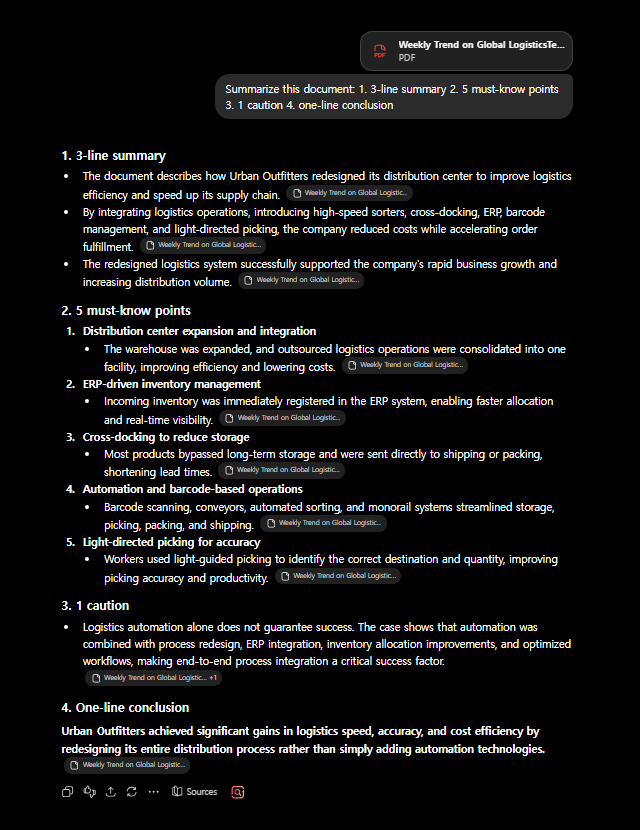
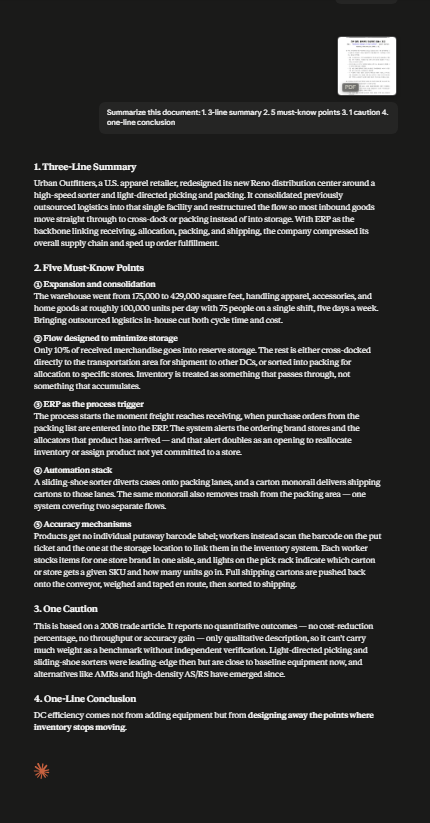
Just "summarize this" gives a flat answer. Ask like this.
Organize this document in the format below:
1. A 3-line core summary
2. 5 must-know points (numbered)
3. 1 caution I must not miss
4. A one-line conclusion
Setting the format — that's the key. But each document type has different things to watch for, right? We prepped them by type. 👇
Summary prompts by document type
📄 Contract
From this contract, pull out clauses that could be unfavorable to me, penalties, deadlines,
and whether it auto-renews. Explain in plain words.
📊 Business / market report
Organize this report's key conclusion, 3 supporting data points, implications,
and possible counterarguments.
📚 Paper / research
Explain this paper so a non-expert gets it: what it found, how,
and what its limits are, in 3 paragraphs.
🗂️ Meeting materials
From these materials, pull only the decisions, owners and deadlines into a table.
Now it's time to unpack "why NotebookLM for big documents." 👇
Why NotebookLM for big documents?
Feed a too-long document to a regular AI and it misses the ends or gets cut off. NotebookLM, on the other hand —
- Takes up to 50 documents at once
- Points to the source — "which page it came from" for each answer
- And it's completely free (saner.ai)
💡 If handling stacks of material is your job, NotebookLM alone changes your research.
Fast and easy — but there's one last thing to check. 👇
Before you trust it, once more
AI summaries are fast but sometimes drop something important or make it up.
- Cross-check numbers, dates and amounts against the original
- For contracts and legal documents, don't leave the final call to AI
- If unsure, confirm with "quote the original text from page ○○ verbatim"
This one habit prevents mistakes.
🧩 Too long to feed at once? Split and summarize
For a document that's simply too long to hand over in one go (hundreds of pages), split it like this.
- Split by section or chapter — using the table of contents, break it into 5–10 page chunks and get a "3-line summary" of each.
- Gather the partial summaries and re-summarize — paste just those summaries back in and ask, "pull the whole thing together on one page."
- Or skip the chopping with NotebookLM — it takes the whole file at once, so no splitting needed, and it even points to the source.
Tip: when you split, add "remember the earlier summary and continue" so the thread doesn't break.
FAQ
Q. How do I add the PDF? Most have a file-attach button; if not, copy the text and paste it.
Q. Does it work with non-English documents? Yes, well.
Q. What about scanned images? You need a tool with text recognition (OCR). NotebookLM and ChatGPT mostly handle it.
Read next
Hashtags: #PDFsummary #documentsummary #NotebookLM #usingAI #worktips