Stop Memorizing Excel Formulas — Let AI Do It
Firing up another search just to write one =VLOOKUP(...)? The era of memorizing function names and argument order is over.
Now you just say "here's what I want to do" in plain words, and AI hands you a finished formula. It even fixes the errors.
Here's what to ask and how, step by step. 👇
First, where should you ask?
| Situation | Tool |
|---|---|
| Build & explain formulas | 📝 ChatGPT · Claude |
| Right inside Excel | Microsoft Copilot (built into Excel) |
For most cases, just pasting your situation into ChatGPT is enough. The key is how you describe it. 👇
Building formulas — ask it like this
You don't need to know the function name. Just say what you want to do.
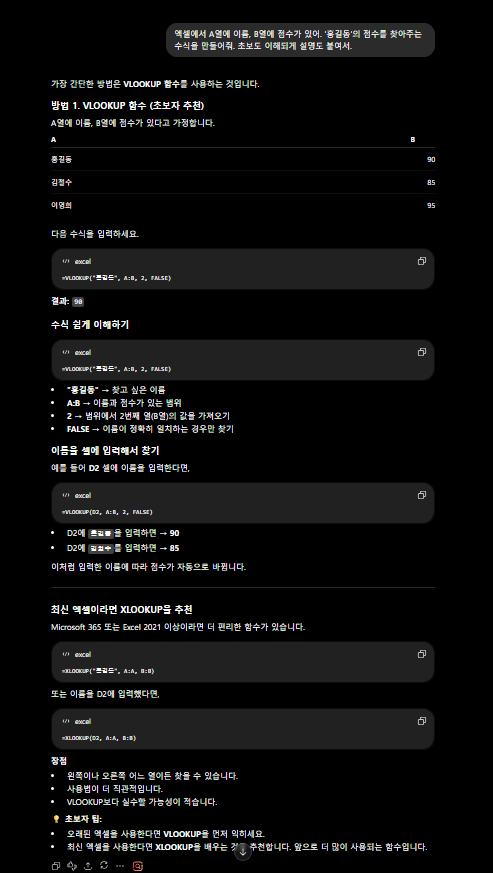
In Excel, column A has names and column B has scores.
Write a formula that finds the score for "John Smith." Add a beginner-friendly explanation too.
→ AI gives you a formula like =VLOOKUP("John Smith", A:B, 2, 0) plus an explanation.
💡 Just telling it your table structure (what's in which column) sends the accuracy way up.
But sometimes a formula you already built throws an #N/A error, right? Here's how to handle that. 👇
Fixing errors — just paste the error in
Give it the error message and the formula together, and it'll track down the cause.
This formula throws an #N/A error: =VLOOKUP(A2, D:E, 2, 0)
Tell me why, and how to fix it.
#N/A(value not found) ·#REF!(reference error) ·#DIV/0!(divide by zero) — it explains the cause and the fix for all of them.
💡 Add "explain it in plain words" and you'll understand why it happened, so you won't get it wrong next time.
Need to go beyond formulas to automating repetitive work? Macros are next. 👇
Macros & VBA — automate without coding
If the task is at the "do this automatically" level, AI writes the macro (VBA) too.
Write an Excel macro (VBA) that creates a new sheet each month and names it 'YYYY-MM'.
Tell me how to paste it in, too.
💡 Even if you don't know how to code, just ask for the copy-paste steps and you can follow right along.
Almost there. Last, a set of prompts you can use at work right away. 👇
5 copy-paste prompts
1. Formula that sums only this month's dates in column A: [situation]
2. Formula that merges two tables on a specific column: [column description]
3. Explain this formula line by line so a beginner gets it: [formula]
4. How to make cells that meet [condition] turn red with conditional formatting
5. How to summarize this data with a pivot table, step by step: [data description]
📊 Know these and you're halfway there — 5 everyday formulas
You don't need the function name. Just say what you want to do, like the left column.
| What you want | Say this to the AI |
|---|---|
| Conditional sum | "A formula that sums sales only for rows where the branch is 'New York'" |
| Remove duplicates | "How to pull a list from column A with duplicates removed" |
| Merge two tables | "A formula that joins the orders table and the customer table by customer ID" |
| Date math | "A formula that auto-calculates years of service from the hire date" |
| Split text | "Split 'John Smith / New York' into two columns — name and location" |
Just include your table structure (what's in which column) and the accuracy jumps way up.
FAQ
Q. Can I paste in my table data? OK as long as you leave out sensitive info (personal data, salaries, etc.). Just describing the structure works too.
Q. Do localized function names work? Yes. It'll build formulas with your language's Excel function names too.
Q. What about Google Sheets? Works. Just add "for Google Sheets."
Read next
- 👉 Summarize long PDFs and reports with AI in 5 seconds
- 👉 How to write work emails with AI in 10 seconds
Hashtags: #Excel #ExcelFormulas #ChatGPTtips #officetips #productivity #VLOOKUP