How to Write Work Emails in 10 Seconds With AI
One email to a client. Polite, but firm, with no misunderstanding. Are you stuck on it for 10 minutes at a time?
There's a way to cut those 10 minutes down to 10 seconds — and smoother than you'd write it, too.
This article even includes copy-paste templates by situation. First, the basic formula. 👇
The basic formula — this one line is all it takes
To have AI write an email, tell it just three things.
To whom + about what + in what tone
Rewrite the content below as a polite work email.
Recipient is a client contact; polite but clear tone:
"I'd like to move next week's meeting to Thursday afternoon."
That solves 90% of cases. But real work has awkward situations — apologies, reminders, refusals… We've prepped those by situation. 👇
Copy-paste templates by situation
The more uncomfortable the email, the more AI shines. Just swap the brackets.
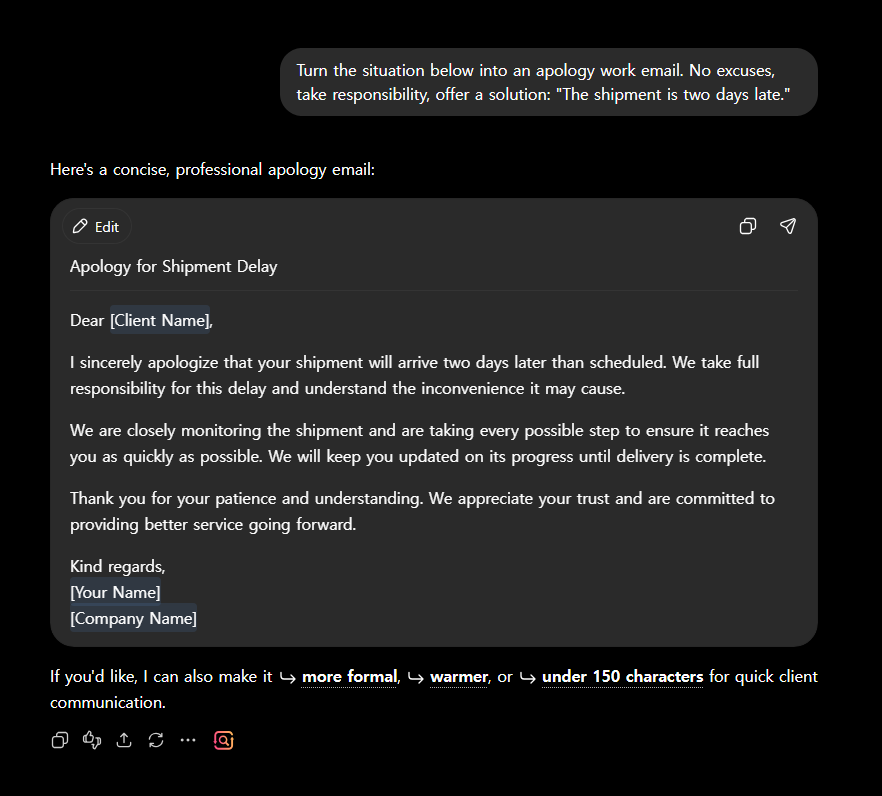
🙇 Apology email
Turn the situation below into an apology work email. No excuses, taking responsibility,
and offer a solution: [what you're apologizing for]
⏰ Polite reminder
Turn the matter below into a reminder email. Don't damage the relationship — gentle but
make the deadline clear: [what, by when]
🙅 Refusal email
Turn the request below into a polite refusal email. Express regret but be clear,
and offer an alternative if possible: [what you're refusing]
🤝 Request for cooperation
Turn the below into a request-for-cooperation email. Lower the recipient's burden, briefly explain
why it's needed, and state the deadline: [what you're asking]
Put in a template but the tone is slightly off? Here's how you fine-tune it. 👇
One line to adjust the tone
If the answer falls a bit short, just add one more line.
- "shorter" / "more polite" / "a bit firmer"
- "make an English version too" (for overseas clients)
- "suggest 3 subject lines as well"
💡 In particular, "an English version" in one line instantly handles overseas email.
By now your time is already way down. Just watch out for one thing. 👇
Before you send, just 30 seconds
AI email is fast but not perfect. Check just three things before sending:
- Whether facts like names, dates and amounts are correct
- Whether you put company secrets into the prompt
- Whether any phrasing feels off for your situation
These 30 seconds prevent accidents.
Situation-based email openers (copy-paste)
Stuck on that first line? Just pick your situation.
| Situation | Opening line example |
|---|---|
| Request | "I'm reaching out because there's something I'd like to ask regarding [ ]." |
| Apology | "First, please accept my apologies for the inconvenience caused by [ ]." |
| Thanks | "Thank you so much for your help with [ ] the other day." |
| Checking in | "Sorry to bother you when you're busy, but I wanted to check on where [ ] stands." |
💡 Add "put this email in 3 polite lines" and AI will finish the rest for you.
FAQ
Q. Doesn't it feel awkward every time? The more specific you are about recipient and tone, the more natural it gets.
Q. Is it good at polite forms in my language? Yes. Just specify "in a polite, formal tone."
Q. Can I paste a company email as-is? Leave out sensitive info and it's usually fine.
Read next
Hashtags: #workemail #usingChatGPT #worktips #AIwriting #productivity