How to Make a Slide Deck (PPT) in 1 Minute With AI
A presentation tomorrow morning, and the slides are blank. We all know this one.
You used to pull all-nighters. Now, just one line for the topic and in 1 minute a finished deck appears.
The key tool is Gamma. Here's how to use it — and how to polish it so it doesn't look AI-made — in order. 👇
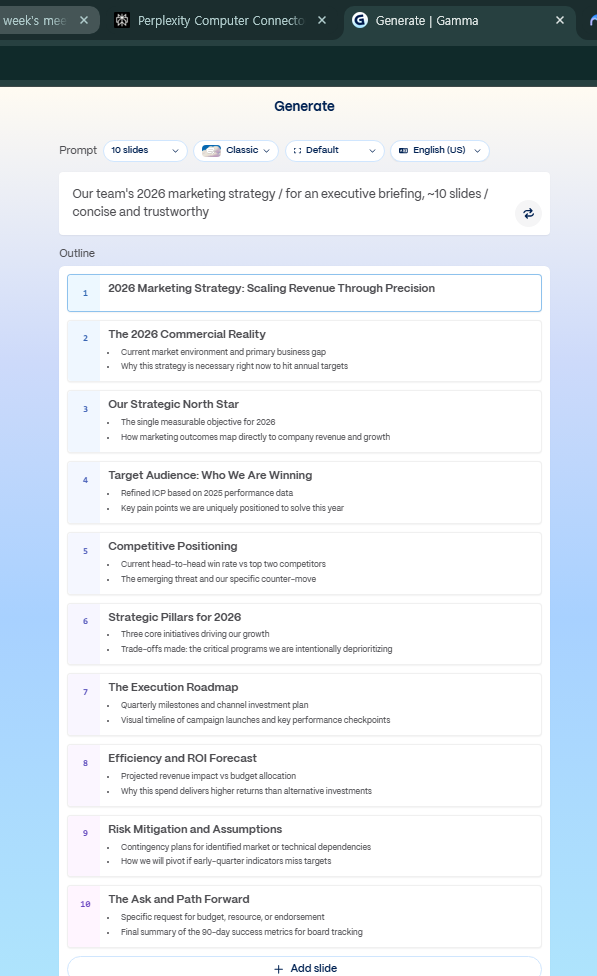
First, which of the 3 ways to start
Gamma has three ways to start. Pick the one that fits.
| Method | When | Time |
|---|---|---|
| ✍️ Topic only | Starting from blank | 1 min |
| 📋 Paste your text | You have a draft or notes | 30 sec |
| 📄 Convert a document | Turning a report into slides | 1 min |
For most people the first is enough. So let's actually make one. 👇
The 1-minute run — here's how
- Go to gamma.app → sign in (start free)
- Choose "New → Generate"
- Enter the topic, audience and slide count like this:
Topic: Our team's 2026 marketing strategy
Audience: for an executive briefing, around 10 slides
Tone: concise and trustworthy, core points only
- Hit enter → a finished deck appears in 1 minute.
That's not the end. The real difference comes in "polishing." 👇
3 ways to polish so it doesn't look AI-made
How to strip the AI look and make it "your presentation."
- ① Swap the theme — one click changes all colors and fonts. Match your company's tone.
- ② Regenerate per slide — only re-generate the slides you don't like.
- ③ One-line instructions — edit by conversation, like "turn this slide into a table," "add a chart."
💡 It even adds speaker notes automatically, so your script-prep time shrinks too.
Now here are prompts to use right away, by situation. 👇
Copy-paste prompts by situation
📈 Pitch / sales presentation
A pitch deck for [product/service]. Audience is the client company, order of problem→solution→impact→price,
8 slides, persuasive.
📊 Work report
A progress-report deck for [project]. Audience is executives, status→results→issues→next plan,
6 slides, concise and number-focused.
🎓 Lecture / training
A lecture deck on [topic]. Audience is beginners, concept→example→practice→summary,
12 slides, plain words and analogies.
Almost done. Finally, let's cover "how far can you go free?" and wrap up. 👇
How far does free go
Gamma is plenty to start with free. The core create-and-edit features are open on free; the difference from paid is in credits, exports, watermarks and so on.
💡 Make a few free first, and if you use it often, paying later is fine.
Know the alternatives too: if you need a "document" more than a presentation, Canva and MS Copilot (PowerPoint integration) are options. But for speed and ease, Gamma leads.
📐 3 rules that make slides look pro
Take the draft the AI gives you, fix just these three things, and the polish level jumps.
- One message per slide — say exactly one thing on each slide. The rest goes on the next one.
- Keywords over sentences — don't drop in whole sentences; keep only the key words and numbers. Explain the rest out loud.
- Slide count = minutes of talk time — a 10-minute talk means about 10 slides. Over that? Merge boldly or move it to an appendix.
Ask the AI to "make each slide one message, and trim sentences down to keywords," and it reorganizes the deck by these rules.
FAQ
Q. Does it make slides in my language? Yes — enter the topic in your language and it makes them in that language.
Q. Can I export to PowerPoint? PPT and PDF export work (some are paid).
Q. Applying company logo/template? You can reflect colors, fonts and a logo in the theme settings.
Read next
Hashtags: #PPT #Gamma #slidedeck #usingAI #worktips #productivity