How to Let AI Write Your Meeting Notes Automatically
A one-hour meeting. Then another 30 minutes writing up the notes. You can end this do-it-twice setup now.
Just leave a recording (or the video call) running and AI organizes the summary, decisions and to-do list for you.
The method differs by situation (video vs in-person), so we'll go in order. 👇
First, what type is your meeting?
Decide the method and the tool follows.
| Meeting type | Method | Top tools |
|---|---|---|
| 💻 Video call (Zoom, Teams, Google Meet) | Auto-join & record | Otter · Fireflies · each platform's built-in AI |
| 🎙️ In-person | Record → AI summary | A transcription app (e.g. CLOVA Note) · ChatGPT/Gemini |
If your meetings are mostly video, the top row; in-person, the bottom. Let's see each in practice. 👇
💻 Video calls — "a bot attends for you"
Attach an AI note-bot to Zoom, Teams or Google Meet and it joins the meeting and records automatically.
- Otter / Fireflies — auto-join → live transcription → summary and action items when it ends
- Built-in AI — Teams, Google Meet and Zoom also offer their own AI summaries (paid plans)
💡 It pulls "who, what, by when" action items automatically.
In-person meeting? Even simpler. 👇
🎙️ In-person — "record → paste"
The easiest two steps.
- Record/transcribe the meeting with a phone recorder (or a transcription app like CLOVA Note)
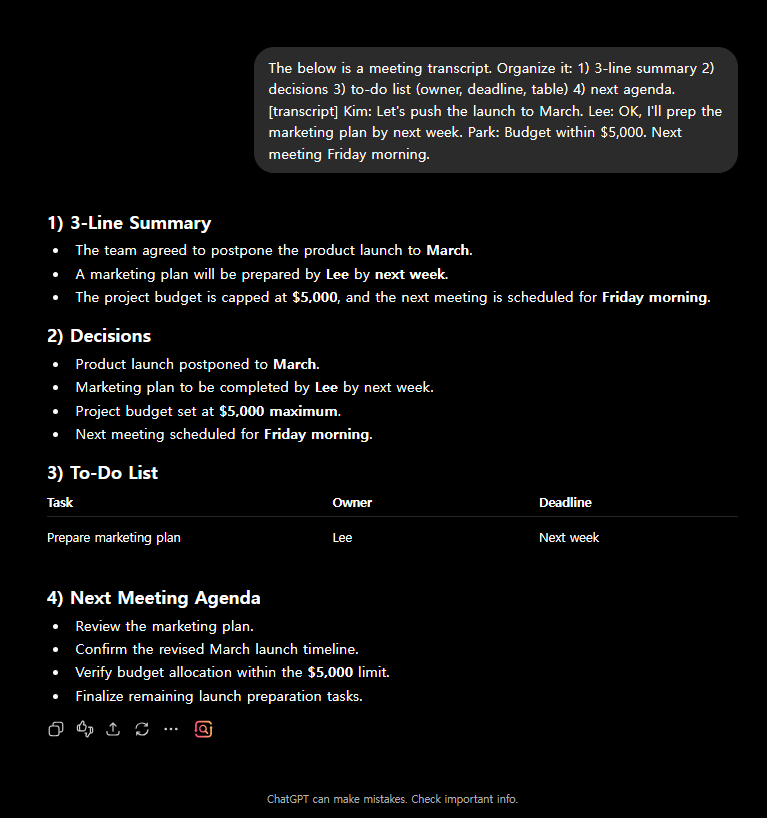
- Put that text into ChatGPT or Gemini and ask like this:
The below is a meeting transcript. Organize it in this format:
1. A 3-line core summary
2. Decisions made
3. To-do list (with owner and deadline, in a table)
4. Agenda for the next meeting
💡 A dedicated transcription app is especially handy for in-person meetings (CLOVA Note is strong at Korean and Japanese).
Now a tip to polish the result into a "ready-to-share" form. 👇
One line to polish it for sharing
Before blasting the organized notes to the team, one more line:
- "turn this into a team-share email"
- "pull just the to-dos into a separate table"
- "organize it in English too" (for an overseas team)
At this point the meeting-notes chore vanishes entirely. Just watch out for one thing. 👇
Before you use it, two must-checks
Convenient, but a sensitive area.
- Recording consent — tell attendees in advance and get consent. (courtesy and policy)
- Confidential meetings — check whether the content can go to an outside AI service. If sensitive, in-house tools only.
Keep these two and you can save time safely.
🗂️ Organize it by meeting type
The same transcript is far more useful when it's organized to fit the kind of meeting it was.
| Meeting type | Ask it to organize by |
|---|---|
| 🧑🤝🧑 1:1 check-in | Key discussion points · agreements · next check-in date |
| 👥 Team meeting | Decisions · to-dos by owner · deadlines |
| 🤝 Client meeting | Client asks · our commitments · follow-up actions |
| 💡 Brainstorming | Idea list · candidates to shortlist · parked for later |
Tip: paste the items above straight into your prompt and say "make a table in this format." Your team gets meeting notes in the same layout every time.
FAQ
Q. Does it work in my language? Yes. Pick a transcription tool strong in your language.
Q. Is it free? ChatGPT and many transcription apps start free. Video note-bots are usually paid.
Q. Dialects and jargon? Mostly recognized, but review proper nouns and numbers.
Read next
- 👉 Summarize a long PDF or report in 5 seconds with AI
- 👉 How to write work emails in 10 seconds with AI
Hashtags: #meetingnotes #meetingsummary #transcription #usingAI #worktips #productivity