Reels & Shorts — How to Mass-Produce Them with AI
You know short-form is great, but making one every day wears you out. Writing the script, filming, captioning, editing…
Semi-automate this with AI and several a day becomes doable. And you never have to show your face.
Script → captions → voice → editing, walked through in order. 👇
The full flow — 4 steps
The big picture first — with the tool you'll use at each step.
| Step | What to do | Tool |
|---|---|---|
| 1 | ✍️ Script | ChatGPT / Claude |
| 2 | 🎬 Assemble the video | Short-form auto-edit tools |
| 3 | 🔊 Voice (narration) | ElevenLabs |
| 4 | 💬 Captions | Auto-caption feature |
Step 1, the script, is what matters most. That's where your view count is decided. One by one. 👇
Step 1 ✍️ Script — the hook is everything
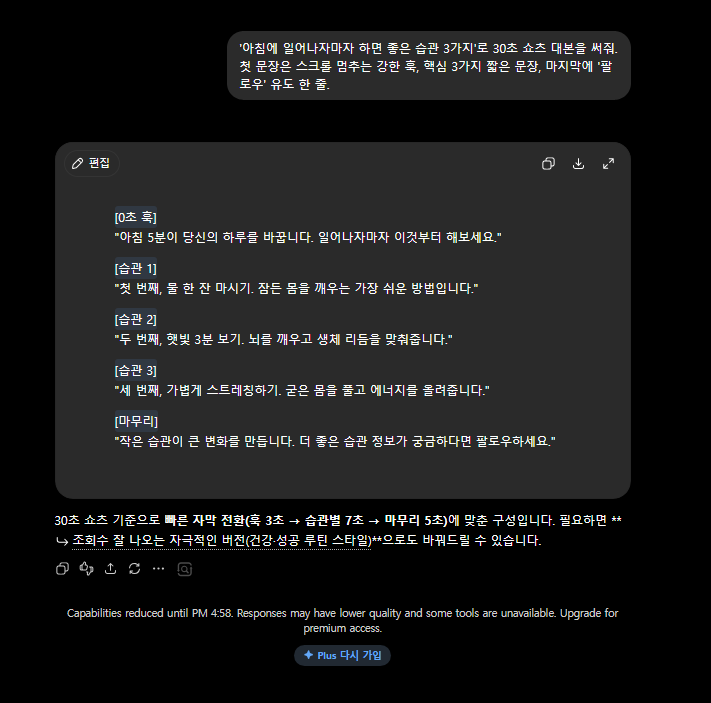
In short-form, if you don't grab them in the first 3 seconds, they scroll on. Prompt for your script like this.
Write a 30-second Shorts script about [topic].
- Open with a strong hook that stops the scroll
- 3 key points, short sentences
- End with one line nudging viewers to follow
💡 Emphasize the "first-3-seconds hook" and your script quality jumps.
Got your script? Now it's time to turn it into video. 👇
Step 2 🎬 Assemble the video — no editing
Some short-form tools take just your script and auto-add stock footage and captions to build the video for you. (The text-to-video kind.)
- Paste the script → scenes and images matched automatically → done
💡 No face, no filming — a particularly good fit for info-style and list-style content.
With the video frame in place, let's add a voice. 👇
Step 3 🔊 Voice — narration that sounds truly human
Use ElevenLabs to turn your script into a natural-sounding voice. Narration done — no recording your own voice required.
- When to use it: channels that never show a face or voice
Step 4 💬 Captions — automatically
Most short-form tools and editing apps support auto-captions. They recognize the audio and lay down captions in a snap.
- 💡 Plenty of people watch short-form with the sound off, so captions are a must.
That's one video done. But if volume is the goal, here's a tip. 👇
The key to mass production — build a "template"
Don't start from scratch each time — settle on a repeatable format.
- Fixed intro/outro, fixed caption style, fixed voice
- Just swap in a fresh AI script each time → 5–10 a day is doable
⚠️ But hooks over volume. Flood the feed with the same low-quality clips and your reach dies. Focus on those first 3 seconds.
The '3-second hook' that pulls views
In short-form, the first 3 seconds are everything. Ask the AI to draft the hook for you.
- "10 opening lines that grab attention within 3 seconds on this topic"
- "An intro that sparks curiosity (make them stop scrolling)"
- "Rewrite the script with a hooking structure that saves the payoff for last"
💡 Hook → point → twist / one-line wrap-up → nudge to follow. Have the AI follow this flow and it's a breeze.
FAQ
Q. Can I do it completely free? The script (ChatGPT) and captions are free; the video tool and voice are free up to a limit, then paid.
Q. Do I have to show my face? No. Info-style content works fine without one.
Q. What about copyright? Only use stock images and music that are cleared for commercial use.
Read next
Hashtags: #Reels #Shorts #shortformvideo #AIvideo #YouTubeShorts #contentcreation